


Effective Coupon Shopping at Walgreens
Friday, March 05, 2010 Hand-posted by Jennifer
 |
Effective coupon shopping at Drug Stores (like CVS & Walgreens) takes on a much different shopping strategy than shopping at Grocery Stores. Each Drug Store has their own Customer Reward Program to help save you even more money in their stores.
Here is a list of several ways you will be able to save money at Walgreens:
- Weekly Sales Ad: Walgreens publishes their ad every Sunday. You can normally find the ad in your Sunday newspaper, near the entrance of the store or online at Walgreens.com.
- Walgreens Store Coupons: Walgreens issues their own store coupons to help you save money on certain items throughout the store. The added bonus to these coupons is that they can be combined with a manufacturer coupon for double the savings.
- Manufacturer Coupons: Make sure to match up your manufacturer coupons to your purchases in addition to any Walgreens coupons that you might have to save extra money. You can always combine a Walgreens coupon with a manufacturer coupon for the SAME item. You can also use coupons toward the purchase of an item that is going to produce a Register Reward.
- Register Rewards: Register Rewards (or RR’s for short) are coupons that are printed out from a Catalina machine next to the register when you buy specific items. Each week in the sales ad you will see various items advertised that, when you buy them, you will earn “Register Rewards” back for your purchase. Register Rewards are essentially like cash that you can use on a future purchase with a few exclusions.
Here are a few strategies to help you maximize your savings at Walgreens:
Find the Walgreens Store Coupons! Remember, these coupons can be used in addition to your manufacturer coupons on the same product. So, where can you find the store coupons?
- Each week you will find a set of coupons inside the weekly sales ad that are good for 7 days.
- They also publish a Monthly coupon booklet which can be found near the entrance of the store.
- The pharmacy is another good place to look for store coupons either on the counter or in a rack near the pickup window.
- There have even been coupons distributed inside a Walgreens Coloring Book.
Find the best deals to plan your trip! You can’t just walk into Walgreens and expect to save a lot of money; you need to have a plan. So, where can you find the best deals to plan your trip?
- You can find them in the weekly store ads posted online at Walgreens.com.
- You can find advance previews of the upcoming ads online (such as iheartwags.com).
Match coupons to the best deals to reduce your Out of Pocket (OOP) expense!
- You can use manufacturer coupons AND store coupons to reduce your Out of Pocket expense.
- To avoiding confusing the registers (and mostly the cashier) make sure to hand over your Manufacturer coupon first. The register is less likely to beep this way.
- Then after you hand over your manufacturer coupons you would want to hand over any Walgreens Store Coupons and Register Rewards you might have.
Simply matching coupons to the sale prices is not the only way to save money at Walgreens, you will also want to take advantage of their Register Reward Program also.
Here are a few advanced strategies to help you maximize your Register Reward deals at Walgreens:

- You will find them listed each week in the sales ad and also on shelf hangtags in the store.
- The easiest place to find them is when they are published online by the coupon bloggers each week (listed above).
- The picture to the right is an example of how a Register Reward item is listed in the sales ad (for 1/31 -2/6). Blink Tears are advertised on sale for $7.99 or FREE after Register Rewards.
Use coupons to make the Register Reward deal better! Finding the RR deals might be pretty easy to do but don’t forget that you can use coupons to make the deal even better. Using the example above, here is how you might find it published on a coupon blog:
Blink Tears $7.99, Get $7.99 RR
- $1.50/1 Blink Tears printable
- $2/1 Blink Tears or Geltears Lubricating Eye Drops in 1/31 RedPlum insert
Pay $5.99 - $6.49 OOP | Get back $7.99 RR | Final = FREE after coupons & RR
What is this telling us?
- First, the item is on sale for $7.99 and when you pay $7.99 at checkout you will get back a Register Reward for $7.99 thus making your purchase FREE after RR.
- Second, the item has a variety of coupons available to reduce your OOP expense. In the example above there were two coupons available for that particular product and by choosing one of the coupons you can pay as little as $5.99 to $6.49 out of pocket and still get back the $7.99 Register Reward. Awesome, right!
Watch out for the Register Reward Exclusions! Most importantly, Register Rewards have expiration dates; make sure you use them so that you don’t lose them. And, aside from the exclusions printed on the RR for certain items that you cannot use it to buy such as Postage, Alcohol, Tobacco, etc. there are also two very important rules about using coupons and Register Rewards.
- You must have the same number of items as you do manufacturer coupons. So, for example, you have two items, two manufacturer coupons & one RR. This will cause the register to beep unless you purchase an additional item commonly referred to as a “filler” so I’d have three items. (I pick out cheap candies for my kids. This makes my kids happy and gives the register something extra to “count”) The register sees store coupons as a “discount” persay so it is excluded from this rule.
- Register Reward deals DO NOT “roll” meaning you can’t use the same RR to buy the same item again and expect another RR. However, you can apply the RR you receive from one deal for another. For instance, you could use the Blink Tears RR and apply it to the Joint Juice RR deal. Just make sure to look at the RR to ensure the second RR deal is not just a different item by the same manufacturer as that would cause it not to print even though it is a different item. But, by applying your Register Rewards to different Register Reward deals you roll your investment & keep your Out of Pocket low.
Take it SLOW! My best advice would be to just choose ONE Register Reward deal for the week. Buy that one deal and that alone. By keeping your transactions small in the beginning you will gain experience to work up to multiple deals and transactions. You will become better at planning out your trips and saving money for your family.
Keep your COOL! Even well planned trips may not go as planned but try to stay calm. A good tip is to checkout in cosmetics or photo so that you and the cashier won’t be rushed by additional customers. Pay close attention at the register so that you can have a mistake fixed by a manager while you’re there instead of having to make a trip back later. And lastly, get to know your Walgreens employees on a first name basis; you’ll be shopping there a lot!

Effective Coupon Shopping at CVS
Friday, March 05, 2010 Hand-posted by Jennifer
 |
Effective coupon shopping at Drug Stores (like CVS & Walgreens) takes on a much different shopping strategy than shopping at Grocery Stores. Each Drug Store has their own Customer Reward Program to help save you even more money in their stores.
Here is a list of several ways you will be able to save money at CVS:
- Extra Care Card: You will need to register for an Extra Care Card in order to get the deals at CVS. You can pick up a card in the store or register online to have one mailed to you. Make sure you provide a valid phone number on it. This is important so that if you forget your card the cashier can look up your account by simply using your phone number and you will still get credit.
- Weekly Sales Ad: CVS publishes their ad every Sunday. You can normally find the ad in your Sunday newspaper, near the entrance of the store or online at CVS.com.
- CVS Coupons: CVS issues their own store coupons to help save you money on certain items throughout the store. The added bonus to these coupons is that they can be combined with a manufacturer coupon for double the savings.
- Manufacturer Coupons: Make sure to match up your manufacturer coupons to your purchases in addition to any CVS coupons that you might have to save extra money. You can always combine a CVS coupon with a manufacturer coupon for the SAME item. You can also use coupons toward the purchase of an item that is going to produce an Extra Care Buck.
- Extra Care Bucks: Each week in the ad you will see various items advertised that, when you buy them, you will earn “Extra Care Bucks” back for your purchase. Extra Care Bucks (or ECB’s for short) are coupons that are printed out at the bottom of your receipt. Extra Care Bucks are essentially like cash that you can use on a future purchase (without some of the exclusions like at Walgreens).
- Green Bag Tag: CVS recently issued a green bag tag program to encourage shoppers to “go green”. You can attach this Green Bag Tag to your reusable shopping bag (or keychain) to remind you to reduce your plastic bag usage. Each time you have the Green Bag Tag scanned at CVS (up to once per day) you will get a bonus $1 ECB every 4 times you scan the card. So, remember to Go Green!
Here are a few strategies to help you maximize your savings at CVS:
Find the CVS Store Coupons! Remember, these coupons can be used in addition to your manufacturer coupons on the same product. So, where can you find the store coupons?
- CVS issues their own “Clip-Free” store coupons to help you save money on certain items throughout the store. You should find a booklet in that you can pick up that identifies which items have “clip-free” coupons for that particular month.
- The pharmacy is another good place to look for store coupons either on the counter or in a rack near the pickup window.
- The Coupon Scanner! Most stores (but not all) have a Coupon Scanner located near the entrance for you to scan your Extra Care Card to get CVS Store coupons. Some of the coupons are for specific products but sometimes they are for a dollar amount off your purchase ($5 off $20, for example). You can keep scanning your card until it says “no coupons available”.
- Your email. Register a valid email address with CVS and they will send you valuable store coupons to print for savings!
- Your receipt. Along with your Extra Care Bucks that print at the bottom of your receipt you will often see coupons printed out.
Find the best deals to plan your trip! You can’t just walk into CVS and expect to save a lot of money; you need to have a plan. So, where can you find the best deals to plan your trip?
- You can find them in the weekly store ads posted online at CVS.com.
- You can find advance previews of the upcoming ads online (such as iheartcvs.com).
Match coupons to the best deals to reduce your Out of Pocket (OOP) expense!
- You can use manufacturer coupons AND store coupons to reduce your Out of Pocket expense.
Simply matching coupons to the sale prices is not the only way to save money at CVS, you will also want to take advantage of their Extra Care Buck Program also.
Here are a few advanced strategies to help you maximize your Extra Care Buck deals at CVS:
Find the Extra Care Buck deals! Where can you find the Extra Care Buck deals?
You will find them listed each week in the sales ad and also on shelf hangtags in the store.
- The easiest place to find them is when they are published online by the coupon bloggers each week (listed above).
- The picture to the right is an example of how an Extra Care Buck item is listed in the sales ad (for 1/31 -2/6). Dove Men’s Care is advertised on sale for $5.49 or FREE after Extra Care Bucks.
- CVS has limits on the number of items you can purchase each week which are listed in the ad and on the hang tags. Once you reach the limit it will also show at the bottom of your receipt.
Use coupons to make the Extra Care Buck deal better! Finding the ECB deals might be pretty easy to do but don’t forget that you can use coupons to make the deal even better. Using the example above, here is how you might find it published on a coupon blog:
Dove Men’s Care $5.49, Get $5.49 ECB (Limit 2)
- $1/1 Dove Men’s Care printable
- $1.75/1 Dove Men+Care Body and Face Bar 4Bar pack or larger in 1/31 RedPlum insert
- $1.25/1 Dove Men+Care Body Wash or Scrubber 13.5oz or larger in 1/31 RedPlum insert
Pay $3.74 - $4.49 OOP | Get back $5.49 ECB | Final = FREE after coupons & ECB
What is this telling us?
- First, the item is on sale for $5.49 and when you pay $5.49 at checkout you will get back a Extra Care Buck for $5.49 thus making your purchase FREE after ECB.
- Second, the item has a variety of coupons available to reduce your OOP expense. In the example above there were three coupons available for that particular product and by choosing one of the coupons you can pay as little as $3.74 to $4.49 out of pocket and still get back the $5.49 Extra Care Buck. Awesome, right!
Quick Tip: CVS will take expired manufacturer coupons as long as the register doesn’t beep; normally if they’re just a week or two old.
Watch those Extra Care Bucks! Let’s look at a few tips about the Extra Care Buck.
- Extra Care Bucks have expiration dates; make sure you use them so that you don’t lose them.
- Think you have your out of pocket math figured down to the penny and something goes awry at the register and they won’t take one of your coupons or ECB’s? The CVS Register looks at coupons & ECB’s a little weird.
- How do you figure it out? Take the Total Cost of your products minus Store Coupons minus Extra Care Bucks plus Tax minus Manufacturer Coupons
Confusing? Well, at any other store besides CVS you can take the Total Cost of your products and subtract any applicable coupons to get your OOP expense but the CVS register works quite differently as you can tell.
Take it SLOW! My best advice would be to just choose ONE Extra Care Buck deal for the week. Buy that one deal and that alone. By keeping your transactions small in the beginning you will gain experience to work up to multiple deals and transactions. You will become better at planning out your trips and saving money for your family.
Keep your COOL! Even well planned trips may not go as planned but try to stay calm. A good tip is to checkout in cosmetics or photo so that you and the cashier won’t be rushed by additional customers. Pay close attention at the register so that you can have a mistake fixed by a manager while you’re there instead of having to make a trip back later. And lastly, get to know your CVS employees on a first name basis; you’ll be shopping there a lot!
Q&A: Rolling RR’s at Walgreens
Monday, September 21, 2009 Hand-posted by Jennifer

I received the following questions in my email from Pamela W. and thought it would be helpful to post the answer here for everyone else.
Question 1: Can multiple RR’s from the same product purchase be used together on a future purchase? For example, last week I went to Walgreens multiple times and now have 3 Carefree RR of $2 and 5 Triaminic RR of $5 each. Could I use several of each one on the same transaction?
Answer: Yes. You can use multiple RR’s to pay for a future purchase however, you will not receive any new RR’s if you purchase some of the same items that produced the RR’s in the first place.
Also, you can do this as long as your Walgreens allows multiple RR’s to be used in one transaction. Even though the registers will allows it as long as you have enough items vs. coupons/RR’s you might find a store that will not allow multiple RR’s to be used for payment.
So, YMMV. (Your mileage/manager may vary)
Another great tip to remember is that an RR will attach itself to an item in your purchase so make sure you have enough items to cover the amount of coupons and RR’s in your hand. So, for example, you cannot buy 1 item for $20 and use 4 $5 RR’s without buying 3 additional “fillers”.
Question 2: When you refer to a RR being able to roll onto itself, I believe that means that you can use the RR from that product on your next purchase of that product and still receive the RR. I saw a reference to that for Walgreens this week on Sally Hansen Hard as Nails. I accidentally used a $2 RR from carefree last week when I bought Carefree again and so the RR didn’t print out. How do you know when the RR will roll on itself?
Answer: Yes, you are correct in referencing the Sally Hansen deal that was rolling on itself.
The computers are setup for the RR’s to be used on future purchases preventing you from purchasing the same item over & over but sometimes there is a glitch that will allow them to roll. How it is found out is basically trial and error. Some couponers will intentionally make a purchase to see what happens.
If anyone else has any additional suggestions please feel free to comment. Thanks in advance!
Target.com Official Corporate Coupon Policy
Monday, September 21, 2009 Hand-posted by Jennifer

I have wonderful news for any Target shoppers who have had problems using coupons in the past.
The official Target corporate coupon policy is now available online and covers many of the issues that most of us have faced in the past!
Target Stores Coupon Policy
Coupons are a great way to save even more when shopping with us, and it's easy to use them at our stores.
- Target accepts one manufacturer coupon and one Target coupon for the same item (unless prohibited)
- Super Target coupons can be used in any Target store if the store carries the item
- We gladly accept valid internet coupons
Because of the variety of coupons available to our guests, we do have some guidelines for how coupons can be redeemed at Target.
When accepting coupons, we use the following guidelines:
- We accept two kinds of coupons: Target-issued coupons and manufacturer-issued.
- We'll accept one Target coupon and one manufacturer coupon for the same item, unless either coupon prohibits it.
- Coupon amount may be reduced if it exceeds the value of the item after other discounts or coupons are applied.
- We can't give cash back if the face value of a coupon is greater than the purchase value of the item.
- We can't accept coupons from other retailers, or coupons for products not carried in our stores.
- All valid coupons should be presented to the cashier while you're checking out.
Learn more about the Target.com Pricing Policy.
I suggest that you go HERE to print this policy directly from their website to carry in your coupon binder.
Thanks Deal Seeking Mom!Where and how to get your coupons
Sunday, May 03, 2009 Hand-posted by Jennifer
Check your sales ads & junk mail. Coupon inserts in the Sunday paper aren’t the only place you’ll find coupons. Check all the pages of the newspaper, Parade magazine, and even places like your junk mail you get in the middle of the week. There won’t be many but sometimes there are some good ones snuck in there.
Check your magazines. The Wal-Mart All You magazine
 is a great resource for coupons but you can only purchase it at Wal-mart or by subscription. However, All You isn’t the only magazine that has coupons so keep your eyes peeled.
Go to the company’s website. If you like a specific product and rarely see coupons for it then checkout the company’s website. I talked about asking a manufacturer for mailer coupons here plus, alot of times you can end up on a newsletter or mailing list for future coupon offers.
Use multiple resources. There are mounds of printable and electronic resources to get coupons rather than just in a newspaper. Use them. You can find a list of a few in the toolbar above and here.
Signup for FREE samples. There are alot of free samples that you can signup for and many times the sample will include a coupon. As a suggestion I recommend creating an email specifically for freebie offers! Wal-mart has a list here that is updated frequently and the samples come quick.
Buy some coupons. The Coupon Clippers will do the cutting for you and you can get multiples of the coupons that you like. This is helpful when their is something that you want to be able stock up on.
Register for store cards & programs. Make sure you that you register for e-newsletters to keep informed on sales and coupons available. Call customer service to register your store card and let them them you want to make sure your loyalty card is marked to receive promos, discount offers and coupons.
You CAN Save Money on Newspaper Delivery
Monday, April 27, 2009 Hand-posted by Jennifer

In order to save money using coupons you have to get the newspaper. Now, how you get the newspaper is entirely up to you. You and only you can decide what is the best decision for your family & what works.
Getting inserts from friends: Not a bad deal since the expense doesn’t fall on you but can be sporadic.
Buying newspaper at store: Sometimes inserts are missing or coupons are slightly different.
So, being that friends can sometimes be unreliable and if I’m not feeling perky enough to drive out to the store to buy my inserts is the reason I suggest getting the newspaper delivered at a discount.
In my case, my paper is $2.00 at the store. So, $2.00 x 52 weeks = $104.00 Plus, factor in gas expense! That makes buying the paper even more costly. Why would you want to go to all that trouble?
Then look at newspaper delivery: I personally saved almost 75% by subscribing to the weekend edition! So, Correct me if I’m wrong but who wouldn’t want to buy FOUR Sunday papers for the same price as ONE and get the rest of the weekend edition for FREE practically.
Why eight subscriptions? Well, there is five in my family and a few extra for help in stockpiling.
CLICK HERE to go to Discounted Newspapers and get a quote on your local paper.
Don’t forget to read more here to learn how to organize your coupons and here for some Coupon 101.
Coupons Resources – Printables & E-Coupons
Saturday, April 11, 2009 Hand-posted by Jennifer
I tried to compose a few of the tops sites in my navigational toolbar above under COUPON RESOURCES. Below is a list of what you will find available. I hope you like!
**PRINTABLE SITES**
- A Slickdeals Thread
- Betty Crocker
- Coupons.com
- Eat Better America
- General Mills Family Cents
- Naturally Savvy (Organic)
- Pillsbury
- RedPlum
- SmartSource
- Target Coupon Generator
- Cellfire E-Coupons
- P&G E-Saver E-Coupons
- Shortcuts.com E-Coupons
- UPromise E-Coupons
Let me know if I missed anything that you would like to see in there as well!!
Couponers Language Translated - Learn It
Monday, April 06, 2009 Hand-posted by Jennifer
Translations for Learning Coupon Language and all the funny Coupon Codes.
- ALA = As Low As (used in cost breakdown to show the least amount a product might cost)
- BLINKIES = In-Store Smart Source Coupons called “blinkies” because of the little blinking box near products.
- BOGO/B1G1 = Buy One Get One
- BTFE - Box Tops for Education (School reward program)
- CATALINA = Coupon printed at register after purchased qualifying items. These are mostly to use on other items or may have promotional messages.
- CLFE = Campbell’s Labels for Education (School reward program)
- CNP = Coupon Near Product (similar to BLINKIES)
- Coloring/Activity Booklet = Walgreens has these in their kids coloring isle. It has jungle animals on the front and 1 sheet of small coupons on the inside when you open the front cover.
- CPN = Coupon
- CRT = Customer Receipt Tape. CVS receipt coupons to be used at CVS/pharmacy stores only.
- DBL= Coupon that a store doubles in value
- DND = Do not Double (Some coupons have this language)
- EB/ECB = ExtraCare Bucks you can use at CVS/pharmacy only.
- ESC = Easy Saver Coupons from the savings booklets from Walgreens.
- FAR = Free After Rebate
- GC= Gift Card
- GM = General Mills
- IP or IPQ = Internet Printable coupons
- IVC = Instant Value Coupon (Walgreens Store coupon found in monthly Easy Saver Booklet)
- J&J = Johnson & Johnson Products
- K = Kellogg’s (Coupon Insert you will find in the Sunday Papers. These are rare but usually 1-2x a year you will find these.)
- MFG = Manufacturer
- Mailer = These are coupons that are sent directly from the manufacturer to your mailbox.
- MIR = Mail in Rebate
- OOP = Out of Pocket
- OOS = Out of Stock
- Parade = Parade Magazine that comes out in the Sunday paper. This has coupons occasionally.
- P&G = Proctor & Gamble (Coupon Insert you will find in the Sunday Papers at least once a month.)
- Peelie = Coupon you peel off package.
- PSA = Prices Starting At
- Q = coupon
- RC = Rain Check
- RP= Red Plum (Coupon Insert in your mailbox or Sunday paper depending on your area.)
- RR = Register Rewards at Walgreens (Similar to Catalinas)
- SS= Smart Source (Coupon Insert you will find in the Sunday Papers almost every week.)
- STACKING = Using a store coupon plus a manufacturer coupons for one product.
- TC = Target in store coupon.
- TGC = Target Gift Card.
- TEAR PAD = A pad of coupons or MIR near a product or on display. These are usually manufacturer’s coupons that you can use at any store which accepts manufacturer’s coupons.
- TS = Trial Size
- UPC = Universal Product Code
- WG, WAG, WAGS = Walgreens
- WYB= When You Buy
- YMMV = Your Mileage May Vary (Depends on certain store policies/factors whether the deal will work.)
- $X/X = Means you will get a X amount of X items. Like $1 off 1, $2 off 1, $2 off 2, etc.
- X/$X = Means you will get X items for X amount. Like 2 items for $1 (.50/each). This is sometimes confusing because you don’t always need to buy the full X amount to get the discounted price unless the offer specifically states you must buy X amount. A good example is with a 10/$10 sale. You are basically paying $1 for X amount that you want to buy and not being required to have to buy all 10.
I hope everyone enjoys all the translated couponer language and if you see anything that needs added to the list just leave a comment. Happy couponing!

Trouble Printing Coupons? Easy Peasy Fix…
Sunday, March 22, 2009 Hand-posted by Jennifer
I had a reader comment that she was having trouble printing coupons. The easiest for me to say is that if it doesn’t print in your Internet Explorer browser then copy the link over to Firefox which will normally solve the problem. It’s really trial and error. If it doesn’t work in one then you switch to another.
But, if you want to get all technical and fix the link yourself then I have grabbed these great tips from The Freebie Blogger which are awesome! So, if you keep getting the “please wait” and then nothing ever happens these tips may be helpful to you. Happy Printing!
Problems printing Bricks coupons? This may fix your problem!
So, everyone uses different browsers, from IE to FireFox to Safari.Sometimes people paste Coupons.com/Bricks links that they received in FireFox, which do not work in Internet Explorer or vice versa. You get the “Please wait…” or “Please Install The Coupon Printer” even if you already did.
This trick will allow you to simply change 2 characters in the URL to make a FireFox link work in Internet Explorer and vice versa
Here’s how easy it is, the following is a FireFox link:
http://bricks.coupons.com/Start.asp?tqnm=ri3peuo59687503&bt=wg&o=53740&ci=1&c=GM&p=TyQrvJA
note the “wg” in the URL. This link gives the repeating Please Install The Coupon Printer in Internet Explorer.
To make that link an Internet Explorer link we simply change “wg” to “wi” OR “vi” (in this case, both variations work, other coupons it may be wi or vi, trial and error):
http://bricks.coupons.com/Start.asp?tqnm=ri3peuo59687503&bt=wi&o=53740&ci=1&c=GM&p=TyQrvJAY
or
http://bricks.coupons.com/Start.asp?tqnm=ri3peuo59687503&bt=vi&o=53740&ci=1&c=GM&p=TyQrvJAY
UPDATE: If you want to print Bricks coupons on a MAC with Safari, replace the “wg”, “wi”, or “vi” to “xs”. You can also do the reverse, take a Safari link “xs” to IE “wi” or “vi” or to FireFox “wg”.
You do the opposite if you want to print an Internet Explorer link in FireFox!
Introduction – Couponing 101
Friday, March 13, 2009 Hand-posted by Jennifer
“What’s the point of using coupons? I mean, is there really a need for me to save that extra .35cents? Wohoo, right?”
“I don’t really have the time to clip them so it’s not something I could do.”
Up until sometime last year this was the way I felt. Sometimes I would buy an item in the store with a coupon attached to the product (a peelie) and bought it with every intention on using that big ole .35cents off that was stuck to it. Well, sometimes the cashier forgot to peel it off and I wouldn’t notice it until I was at home. What were my thoughts? “Oh well! It was only .35cents.”
And at that point in my life I thought I was living frugally. I did my shopping for the most part about once per month and would sometimes have two buggies of “value priced” items. I compared the shelf prices between generics and name brand and I calculated the cost per ounce too. So, I was at least trying a little bit but just not effectively.
I stumbled across a couponing post while at work one day on a break room computer. I was shocked! I quickly wrote down the site so I could read more at home. I started saving my coupons and have been hooked ever since.
I’ll show you my system step-by-step and hopefully you can start saving boodles of money too! Good luck and let me know if you ever need any help along the way!
Ready To Get Started With Coupons?
Friday, March 13, 2009 Hand-posted by Jennifer
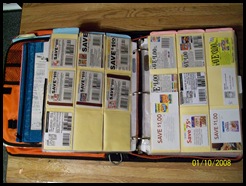
I will be providing step-by-step details and linking them up here for your reading convenience.
Feel free to guide me with comments and topics you would like to hear about as I bring all this together.
Now, let’s have fun!
- Navigating on Coupon Mommie – Getting around the site
- Being married to a coupon queen - A must read post for a big LOL
- Setting up your binder - Pictures of mine here
- Learning the lingo – Couponers Language Translated
- Coupon Resources - Where to get printable coupons & E-coupons
- Getting Coupons – Where and how to get your coupons
- Help for printing coupons – A trick to change the link address
- Next up will be a variety of posts
- …using coupons effectively
- …and even more topics
- …stay tuned